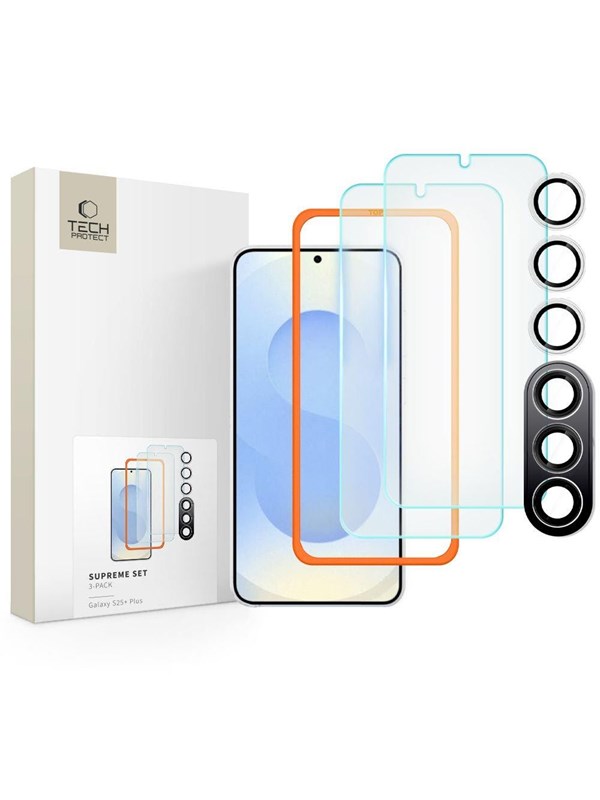
Tech-Protect Supreme Set for Samsung Galaxy S25+ 2x Tempered Glass for Display / Tempered Glass for Camera - Clear
Dubbelkollat idag
Jämför 1 butik
- Proshop, 186 kr plus 59 kr frakt. Till butik (öppnas i ny flik)
I lagerFrakt 59 krDubbelkollad 12:02
186 kr
Lägst
Priser från butikernas flöden kan ha ändrats: det är priset hos butiken som gäller, så kontrollera det innan du handlar.
Prishistorik
Köp nu eller vänta?
Pris idag
186 kr
- Lägst
- 171 kr
- Snitt
- 177 kr
- Högst
- 186 kr
| 2026-10-06 | 174 kr · Lägst hos Proshop |
|---|---|
| 2026-10-08 | 186 kr · Lägst hos Proshop |
| 2026-10-11 | 171 kr · Lägst hos Proshop |
| 2026-10-17 | 186 kr · Lägst hos Proshop |
Om produkten
Tech-Protect Supreme Set for Samsung Galaxy S25+ 2x Tempered Glass for Display / Tempered Glass for Camera - Clear
Läs merLäs mindre
Tech-Protect Supreme is an irreplaceable protective kit that protects the screen and lens of your device during everyday use. The tempered coating for the display is made of light and milled glass with a thickness of 0.3mm and a hardness of 9H. The crystal clear glass ensures image clarity, perfect reproduction of color saturation and does not disturb the sensitivity of touch. In addition, it is covered with a high-quality oleophobic coating, which minimizes the amount of fingerprints or other impurities left. Protective lens cap made of high-quality tempered glass with a hardness of 9H. Precisely cut, it provides protection against scratches and breakage. The set includes installation accessories along with a positioning frame, thanks to which installation is very easy and accessible to literally everyone. INSTALLATION INSTRUCTIONS: 1) Start installation in the bathroom right after bathing - the water vapor will absorb all the dust from the atmosphere and it will not interfere with your installation. 2) Clean and degrease the surface of the screen thoroughly, then use a dry cloth to polish it to a shine. 3) Install the shell as evenly as you can - you can position it with the help of the positioning frame from the kit. 4) Get rid of air bubbles by pressing the whole thing down in a circular motion for a few dozen seconds. Do this so that the adhesive layer bonds to the screen as tightly as possible.